
ArtisanGo
L’app compagnon pour artisans indépendants et équipes, synchronisée directement avec Bexio.

14 jours d’essai gratuit
Version iOS en préparation
Votre journée avec ArtisanGo
Vos données restent sur votre téléphone
Identifiants chiffrés localement, lecture des tickets en local. Rien ne transite par un serveur tiers. Une seule clé de chiffrement, que vous pouvez sauvegarder.
Signé sur place
Le client signe du doigt sur votre téléphone. Le document part signé.
Le chrono tourne pendant que vous travaillez
Heures et prestations saisies sur le chantier en quelques taps. Pause ou arrêt directement depuis la notification, sans ouvrir l’app. Lancez-le depuis la fiche du client, ou démarrez d’abord et nommez le chantier plus tard.
La QR-facture se remplit toute seule
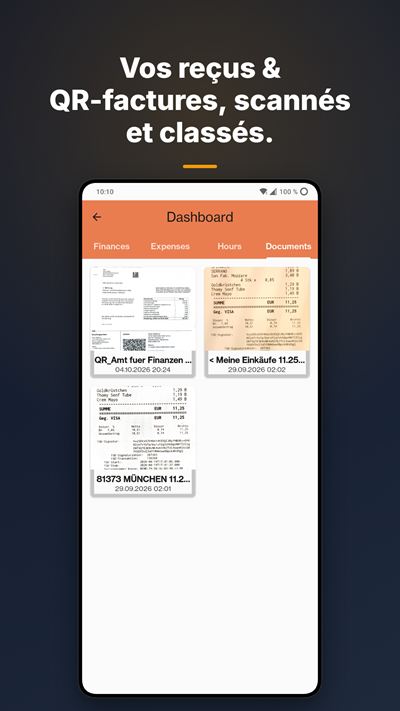
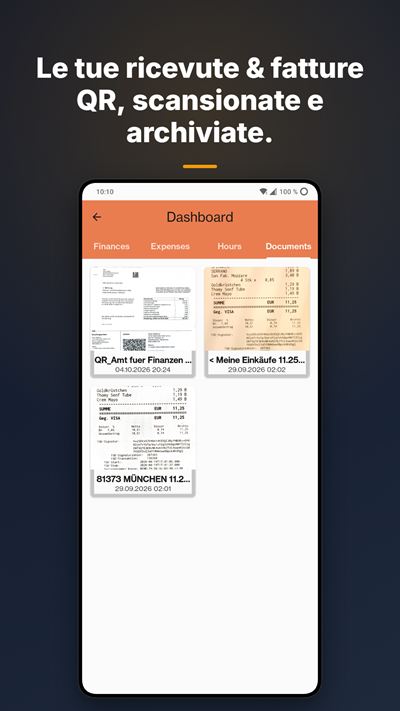
Montant, créancier et référence lus dans le code QR suisse. Le compte de charge et le taux de TVA de ce fournisseur sont repris automatiquement.
Ça marche aussi au sous-sol
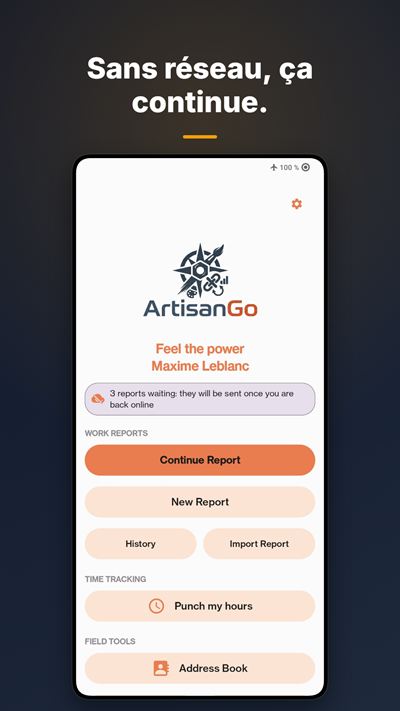
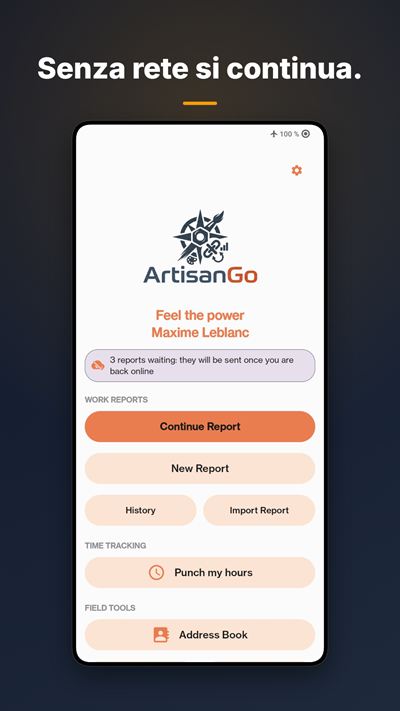
Mode hors-ligne complet : au sous-sol, dans un tunnel ou à la montagne. Tout se synchronise au retour du réseau.
Chez Bexio avant d’avoir quitté le chantier
Rapports, factures, devis, contacts et catalogue synchronisés avec votre compte Bexio. Si Bexio refuse un document, l’app vous dit quel champ corriger.
Pas de Bexio ? ArtisanGo fonctionne aussi seul
Sans Bexio, l’app fait tout elle-même : devis, factures, rapports et tableau de bord (finances, caisse avec solde du mois, heures, boîte de réception), même sans abonnement. Avec Team : plus aucune limite, l’envoi par e-mail, votre logo sur vos PDF et aucune mention ArtisanGo.
Voir toutes les fonctionsMasquer
Le bon client, sans chercher
Vos clients sont géolocalisés : ceux à moins de 3 km s’affichent automatiquement en premier, puis les plus récents. Avec Bexio, écartez-en vos fournisseurs ou toute autre catégorie de contacts.
Des documents impeccables
Rapports et factures en PDF propres, prêts à envoyer. Avec un abonnement, aucune mention ArtisanGo. Votre logo et la couleur de votre entreprise : avec tout abonnement sans Bexio, ou en Business avec Bexio.
Photographiez le ticket, jetez-le
Enseigne, montant, date et TVA reconnus directement sur le téléphone, sans internet.
Vous savez quoi faire en ouvrant l’app
Factures en suspens ou en retard, devis sans réponse, commandes à livrer : tout sur un écran. Avec Bexio, aussi la TVA facturée de la période et ce qui entre et sort de vos comptes ; avec Business, l’année en graphique et où part l’argent.
Encaisser et relancer sans ouvrir Bexio
Avec Bexio : notez un paiement reçu, envoyez la relance au client, facturez un devis accepté, dupliquez ou renvoyez une facture par e-mail, depuis l’app.
Les contrats d’entretien tournent tout seuls
Avec Bexio : une commande se répète chaque semaine, chaque mois ou chaque année, et Bexio crée le document à la date prévue.
Vous savez si le client a ouvert la facture
Avec Bexio : la fiche du client montre le jour où il a ouvert votre facture ou votre devis. Vue et toujours impayée, c’est le moment de relancer ; jamais ouverte, c’est peut-être une mauvaise adresse e-mail. Et l’itinéraire mène à l’adresse du chantier, pas à celle du bureau.
Deux raisons sociales, une seule app
Gérez plusieurs entreprises Bexio depuis la même app.
Chaque client dans sa langue
Français, allemand, italien et anglais: vos clients reçoivent leurs documents dans leur langue. Si la fiche Bexio d’un client indique une autre langue, l’app vous prévient avant l’envoi.
Le mode employé, rien que l’essentiel
L’écran de l’employé ne montre que son travail. Ses rapports disent qui les a faits et portent la vraie date de signature. Avec un accès Bexio (Team), ils arrivent directement dans votre boîte de réception, prêts à importer. Sans compte Bexio, créez l’employé depuis l’app (Business) : l’app gratuite lui suffit, et son travail vous arrive par code QR, téléphone contre téléphone.
Toute l’équipe aux couleurs de l’entreprise
Avec Business, votre logo et votre couleur arrivent chez vos employés par un simple QR code. Vous décidez aussi si une signature est exigée avant chaque envoi : la règle vaut pour toute l’équipe.
Rien ne se perd
Sauvegardez rapports, documents, scans et réglages dans un dossier à vous : carte mémoire, Google Drive, OneDrive ou Nextcloud. Gratuit à la main, automatique chaque jour avec un abonnement. Rien n’est stocké chez nous.
Les frais de rappel s’ajoutent tout seuls
Avec Bexio : réglez un montant par niveau de relance. À chaque rappel, ArtisanGo l’ajoute sur la facture Bexio, sans TVA, et remplace les frais du rappel précédent. Une facture qui a déjà reçu un acompte se relance sans frais.
Des lignes sans TVA quand il le faut
Marquez un libellé fixe « Sans TVA » pour des frais ou des débours. Sans Bexio, le PDF ne calcule la TVA que sur le reste et affiche la part non soumise. Avec Bexio, la ligne part avec un taux à 0 %.
Retrouvez n’importe quel rapport
Avec ou sans Bexio : l’historique est rangé par date du rapport, mois par mois. Cherchez par client, par numéro, par date ou par le titre de l’intervention.
Heures et absences par code QR
Avec Bexio (Business) : le soir, votre employé vous montre un code QR avec ses heures et ses absences. Vous le scannez, vous cochez ce qui est juste, et tout part dans Bexio à son nom. Les heures écrites dans un rapport se reprennent aussi.
Le tableau de présence
Avec Bexio (Business) : le travail et les absences de chacun, mois par mois : vacances, maladie, accident, service militaire, maternité, paternité. Votre employé reçoit son solde de vacances par code QR.
L’app en images




Faites défiler →
Tarifs
14 jours d’essai gratuit sur tous les abonnements. Sans engagement, résiliable à tout moment via Google Play. Prix en CHF, TVA suisse comprise. Hors de Suisse, Google Play affiche le prix exact dans votre monnaie, taxes du pays comprises.
Utilisez-vous Bexio ?
- Non, je travaille sans → Team, CHF 9.– / mois
- Oui, et je travaille seul → Solo, CHF 14.– / mois
- Oui, et j’ai des employés → Business, CHF 35.– / mois pour vous ; Team, CHF 9.– / mois pour chaque employé connecté à Bexio ; gratuit pour vos employés sans compte Bexio
Team
CHF 9.– / mois
CHF 90.– / an2 mois offerts
Pour l’artisan qui travaille sans Bexio, et pour l’employé sur le terrain d’un patron abonné Business.
- Rapports et clients illimités
- Sans Bexio : devis et factures envoyés par e-mail
- Sans Bexio : votre logo sur vos PDF
- Aucune mention ArtisanGo sur vos documents
- Pour l’employé : chrono, signature du client, rapports transmis au patron
- Sauvegarde automatique : vos rapports et vos réglages repartent tout seuls chaque jour. Et la configuration de votre patron arrive par QR code ou par fichier
- Aux couleurs de l’entreprise : le logo et la couleur choisis par votre patron arrivent sur vos rapports, sans rien avoir à régler
Solo
CHF 14.– / mois
CHF 140.– / an2 mois offerts
Pour l’indépendant qui utilise Bexio.
- Devis et factures envoyés directement dans Bexio
- Rapports, clients et articles illimités
- Tableau de bord financier
- Chrono, scan des justificatifs, signature
- Texte de vos e-mails personnalisable
- Sauvegarde automatique : une fois par jour, vos dépenses, vos pièces et vos réglages repartent tout seuls dans le dossier que vous avez choisi
Business
CHF 35.– / mois
CHF 350.– / an2 mois offerts
Pour le patron qui a des employés (administrateur du compte Bexio).
- Tout Solo, avec votre seul logo sur les documents, y compris ceux que remettent vos employés
- La couleur de votre entreprise sur vos documents : titres et en-têtes à votre teinte exacte, choisie au curseur ou au code hexadécimal, et différente pour chaque entreprise
- Tableau de bord avancé
- Vous seul pouvez déployer votre configuration par QR code, à scanner par chacun de vos employés
- Vous fixez la règle : exigez ou non une signature, du client ou de votre employé, avant chaque envoi. Vos employés la reçoivent avec votre configuration
- Support prioritaire
Toujours inclus, même sans abonnement
- Mode hors-ligne complet
- Carnet d’adresses qui affiche en premier vos clients à moins de 3 km
- Rapports exportés toujours chiffrés. Avec un abonnement, activez votre clé personnelle : l’app génère un code unique, à copier et garder.
- Sauvegarde et restauration manuelles, gratuites pour toujours. Avec un abonnement, la sauvegarde se fait aussi automatiquement chaque jour.
Sans abonnement, ArtisanGo reste utilisable, sans limite de temps : 20 rapports par mois et 30 clients.
Vous avez des employés ? Business pour vous, Team pour ceux qui sont connectés à Bexio, et l’app gratuite pour les autres.
Questions fréquentes
Tarifs et abonnements
Que puis-je faire gratuitement ?
Beaucoup. 20 rapports par mois, 30 clients et le mode hors-ligne complet. Seule différence visible par vos clients : une mention ArtisanGo sur vos documents.
Combien ça coûte ?
Team CHF 9.– par mois ou CHF 90.– par an, Solo CHF 14.– ou 140.–, Business CHF 35.– ou 350.–. L’abonnement annuel vous offre 2 mois. Chaque abonnement commence par 14 jours d’essai gratuit, sans engagement. Sans abonnement, l’app reste gratuite : 20 rapports par mois et 30 clients.
Pourquoi Team (9.–) coûte-t-il moins cher que Solo (14.–) ?
Parce qu’il ne fait pas la même chose. Avec Bexio, Team saisit les heures et les transmet au patron, sans facturer ; Solo facture directement dans Bexio. Sans Bexio, Team suffit pour tout.
Puis-je mettre mon logo sur mes documents ?
Oui. Avec Bexio : abonnement Business. Sans Bexio : tout abonnement payant.
J’ai changé de téléphone : dois-je repayer ?
Non. Touchez « Restaurer mes achats » dans l’app : l’abonnement est lié à votre compte Google, pas au téléphone ni à l’entreprise Bexio. Vos réglages se remettent depuis votre fichier de configuration. Vos données reviennent avec votre sauvegarde et sa clé de secours.
Avec ou sans Bexio
Faut-il Bexio pour utiliser ArtisanGo ?
Non.
Sans Bexio : devis, factures, rapports et tableau de bord, même gratuitement.
Avec Bexio (Solo ou Business) : tout part directement dans votre Bexio.
Je suis Team et je ne peux pas émettre de facture.
Normal si vous êtes connecté à Bexio : vos heures partent chez le patron, qui facture. Sans Bexio, Team facture.
Sans Bexio, comment je suis mon argent ?
Avec la Caisse : ce qui sort et ce qui entre. Notez à la main les rentrées (chantier payé cash, acompte, remboursement). Les factures marquées payées s’y ajoutent toutes seules, avec leur numéro et leur client. Le solde s’affiche pour l’année et pour chaque mois. Ce qu’on vous doit reste à part et ne gonfle jamais le solde. Dans Finances, vos documents sont aussi groupés par mois, avec leur nombre et leur total.
L’app calcule-t-elle ma TVA ?
Avec Bexio, le tableau de bord affiche la TVA facturée : celle de vos factures émises sur la période de décompte (trimestrielle par défaut, semestrielle au taux de la dette fiscale nette, à régler par entreprise). Ce n’est pas forcément ce que vous reverserez : cela dépend de votre régime.
Au quotidien
J’ai lancé le chrono sans choisir de client. C’est perdu ?
Non. Rattachez-le au chantier plus tard, depuis la fiche du client : le temps déjà compté est conservé. Vous pouvez aussi démarrer directement depuis la fiche d’un client du carnet d’adresses, et passer d’un chantier à l’autre en un geste. Jamais deux pointages en cours en même temps.
Ça marche sans réseau ?
Oui, pour tout le monde, version gratuite comprise. Tout se synchronise au retour du réseau.
Puis-je retirer mes fournisseurs du carnet d’adresses ?
Oui, avec Bexio. Les catégories Bexio de vos contacts (Client, Fournisseur, Partenaire et celles que vous avez créées) s’affichent dans la fiche, se modifient depuis l’app et repartent chez Bexio. Dans les réglages de l’entreprise, écartez de la géolocalisation les catégories qui ne vous servent pas : votre carnet ne montre plus que les fiches que vous cherchez vraiment. Un contact créé depuis une QR-facture scannée arrive déjà classé Fournisseur.
Et les factures de mes fournisseurs ?
Avec Bexio, scannez la QR-facture : elle se remplit toute seule. Fournisseur sans TVA ? Choisissez le taux « Aucun », comme chez Bexio. Si Bexio refuse de comptabiliser la facture, l’app vous donne le numéro du brouillon resté chez Bexio et la raison du refus : vous ne la saisissez pas deux fois.
Comment voir l’app comme mon employé ?
Avec Bexio (Business) : dans Paramètres → Entreprise → Collaborateurs, touchez « Voir l’app comme un collaborateur ». L’app se montre comme chez un employé qui a un accès Bexio, et un bandeau « Revenir » sur l’accueil vous ramène à votre vue. Votre abonnement ne change pas, et dans Bexio vous gardez vos droits d’administrateur. Pour un employé sans compte Bexio, le plus simple est d’essayer sur un deuxième téléphone lié.
Et sur iPhone ?
Une version iOS est en préparation. En attendant, ArtisanGo est disponible sur Android, via Google Play. Écrivez-nous à support@artisango.ch si vous voulez être prévenu de sa sortie.
Vos données et la sauvegarde
Mes rapports exportés sont-ils protégés ?
Oui, toujours. Avec un abonnement, activez le chiffrement personnel : l’app génère un code unique, à copier et sauvegarder. Sans ce code, le fichier est illisible.
Mes données sont-elles sauvegardées ?
Oui, si vous l’activez. ArtisanGo ne garde rien sur nos serveurs : vous choisissez un dossier qui vous appartient (carte mémoire, Google Drive, OneDrive, Nextcloud) et la sauvegarde s’y dépose. Réglages → Application → Sauvegarde et restauration.
Qu’est-ce qui est sauvegardé ?
Vos dépenses, vos rapports, vos documents émis, vos scans et leurs justificatifs, vos contacts, vos réglages et votre logo. Le thème et la langue restent propres à chaque téléphone. Vos identifiants Bexio ne sont jamais sauvegardés : après une restauration, vous vous reconnectez.
La sauvegarde est-elle payante ?
Non. Sauvegarder à la main et restaurer sont gratuits, pour toujours. Seule la sauvegarde automatique, une fois par jour sans rien demander, fait partie de l’abonnement.
À quoi sert la clé de secours ?
C’est elle qui ouvre vos sauvegardes. Elle s’affiche dans l’écran de sauvegarde, avec un bouton pour la copier.
Notez-la ailleurs que sur votre téléphone. Sans elle, une sauvegarde ne se rouvre pas, et nous ne pouvons pas la retrouver pour vous. Elle n’existe que sur votre appareil : c’est précisément ce qui fait que personne d’autre ne peut lire vos documents.
Combien ça pèse ?
L’écran vous l’annonce avant de commencer. Les justificatifs scannés font l’essentiel du poids, mais chacun n’est envoyé qu’une seule fois : les sauvegardes suivantes ne transfèrent que les nouveautés.
Où sont mes données, et si j’arrête de payer ?
Sur votre téléphone, et dans votre Bexio si vous êtes connecté. Si vous arrêtez l’abonnement, vous les gardez.
Pas trouvé votre réponse ? Écrivez-nous : support@artisango.ch
14 jours d’essai gratuit
Version iOS en préparation
Google Play et le logo Google Play sont des marques de Google LLC.

Un projet né du terrain
ArtisanGo est co-développé avec Mémoires d’Arbres, entreprise de paysagisme et d’arboriculture, pour coller aux besoins réels des artisans sur le terrain.
ArtisanGo
Die Begleit-App für selbstständige Handwerker und Teams, direkt mit Bexio synchronisiert.

14 Tage gratis testen
iOS-Version in Vorbereitung
Ihr Arbeitstag mit ArtisanGo
Ihre Daten bleiben auf Ihrem Handy
Zugangsdaten lokal verschlüsselt, Quittungen lokal erkannt. Nichts läuft über einen fremden Server. Ein einziger Verschlüsselungsschlüssel, den Sie sichern können.
Vor Ort unterschrieben
Der Kunde unterschreibt mit dem Finger auf Ihrem Handy. Das Dokument geht unterschrieben raus.
Die Stoppuhr läuft, während Sie arbeiten
Stunden und Leistungen direkt auf der Baustelle erfassen, mit wenigen Taps. Pause oder Stopp direkt in der Benachrichtigung, ohne die App zu öffnen. Starten Sie sie in der Kontaktkarte des Kunden, oder starten Sie zuerst und ordnen Sie die Baustelle später zu.
Die QR-Rechnung füllt sich selbst aus
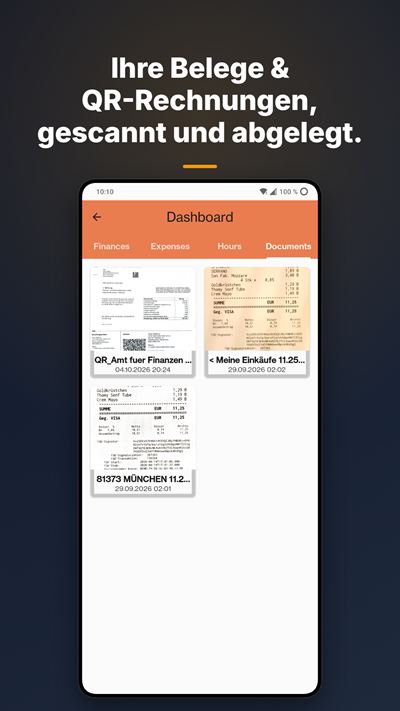
Betrag, Empfänger und Referenz werden aus dem Schweizer QR-Code gelesen. Aufwandkonto und MWST-Satz dieses Lieferanten werden automatisch übernommen.
Funktioniert auch im Keller
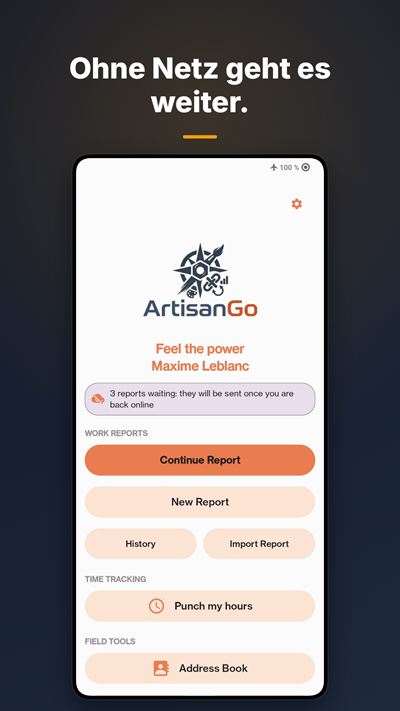
Vollständiger Offline-Modus: im Keller, im Tunnel oder in den Bergen. Alles wird synchronisiert, sobald wieder Netz da ist.
In Bexio, bevor Sie die Baustelle verlassen
Rapporte, Rechnungen, Offerten, Kontakte und Artikel werden mit Ihrem Bexio-Konto synchronisiert. Lehnt Bexio ein Dokument ab, sagt Ihnen die App, welches Feld zu korrigieren ist.
Kein Bexio? ArtisanGo funktioniert auch allein
Ohne Bexio erledigt die App alles selbst: Offerten, Rechnungen, Rapporte und Dashboard (Finanzen, Kasse mit Monatssaldo, Stunden, Posteingang), sogar ohne Abo. Mit Team: keine Limiten mehr, Versand per E-Mail, Ihr Logo auf Ihren PDFs und kein ArtisanGo-Hinweis.
Alle Funktionen anzeigenWeniger anzeigen
Der richtige Kunde, ohne Suchen
Ihre Kunden werden geortet: Wer im Umkreis von 3 km ist, erscheint automatisch zuerst, danach die zuletzt verwendeten. Mit Bexio blenden Sie Lieferanten oder jede andere Kontaktkategorie aus.
Saubere Dokumente
Rapporte und Rechnungen als saubere PDFs, bereit zum Versand. Mit Abo ohne ArtisanGo-Hinweis. Ihr Logo und Ihre Firmenfarbe: mit jedem Abo ohne Bexio, oder mit Business und Bexio.
Quittung fotografieren, wegwerfen
Geschäft, Betrag, Datum und MWST werden direkt auf dem Handy erkannt, ohne Internet.
Beim Öffnen wissen Sie, was zu tun ist
Offene oder überfällige Rechnungen, unbeantwortete Offerten, auszuliefernde Aufträge: alles auf einem Bildschirm. Mit Bexio auch die fakturierte MWST der Periode und die Eingänge und Ausgänge Ihrer Konten; mit Business das Jahr als Grafik und wohin das Geld fliesst.
Zahlungen erfassen und mahnen, ohne Bexio zu öffnen
Mit Bexio: Zahlungseingang erfassen, Mahnung an den Kunden senden, bestätigte Offerte verrechnen, Rechnung duplizieren oder erneut per E-Mail senden, direkt in der App.
Wartungsverträge laufen von selbst
Mit Bexio: Ein Auftrag wiederholt sich jede Woche, jeden Monat oder jedes Jahr, und Bexio erstellt das Dokument zum geplanten Datum.
Sie wissen, ob der Kunde die Rechnung geöffnet hat
Mit Bexio: Die Kundenkarte zeigt, an welchem Tag er Ihre Rechnung oder Offerte geöffnet hat. Angesehen und noch unbezahlt: Zeit zu mahnen; nie geöffnet: vielleicht eine falsche E-Mail-Adresse. Und die Route führt zur Baustellenadresse, nicht zum Büro.
Zwei Firmen, eine App
Verwalten Sie mehrere Bexio-Firmen in derselben App.
Jeder Kunde in seiner Sprache
Deutsch, Französisch, Italienisch und Englisch: Ihre Kunden erhalten ihre Dokumente in ihrer Sprache. Steht in Bexio beim Kunden eine andere Sprache, warnt Sie die App vor dem Versand.
Mitarbeitermodus, nur das Wesentliche
Der Bildschirm der Mitarbeitenden zeigt nur ihre Arbeit. Rapporte zeigen, wer sie erstellt hat, und tragen das echte Unterschriftsdatum. Mit eigenem Bexio-Zugang (Team) landen sie direkt in Ihrem Posteingang, bereit zum Importieren. Ohne Bexio-Konto legen Sie die Mitarbeitenden in der App an (Business): Die kostenlose App genügt ihnen, und ihre Arbeit kommt per QR-Code zu Ihnen, Telefon an Telefon.
Das ganze Team in den Farben der Firma
Mit Business kommen Ihr Logo und Ihre Farbe per QR-Code zu Ihren Mitarbeitenden. Sie entscheiden auch, ob vor jedem Versand eine Unterschrift nötig ist: Die Regel gilt für das ganze Team.
Nichts geht verloren
Sichern Sie Rapporte, Dokumente, Scans und Einstellungen in Ihrem eigenen Ordner: Speicherkarte, Google Drive, OneDrive oder Nextcloud. Manuell gratis, mit Abo jeden Tag automatisch. Bei uns wird nichts gespeichert.
Mahngebühren kommen von selbst dazu
Mit Bexio: Legen Sie einen Betrag pro Mahnstufe fest. Bei jeder Mahnung setzt ArtisanGo ihn ohne MWST auf die Bexio-Rechnung und ersetzt die Gebühr der vorherigen Mahnung. Eine Rechnung mit Anzahlung wird ohne Gebühr gemahnt.
Zeilen ohne MWST, wenn nötig
Markieren Sie eine fixe Bezeichnung «Ohne MWST» für Gebühren oder Auslagen. Ohne Bexio berechnet das PDF die MWST nur auf dem Rest und weist den nicht steuerpflichtigen Teil aus. Mit Bexio geht die Zeile mit einem Satz von 0 % ab.
Jeden Rapport wiederfinden
Mit oder ohne Bexio: Der Verlauf ist nach Rapportdatum geordnet, Monat für Monat. Suchen Sie nach Kunde, Nummer, Datum oder Titel des Einsatzes.
Stunden und Abwesenheiten per QR-Code
Mit Bexio (Business): Am Abend zeigen Ihnen Ihre Mitarbeitenden einen QR-Code mit ihren Stunden und Abwesenheiten. Sie scannen ihn, haken ab, was stimmt, und alles geht auf ihren Namen in Bexio. Auch die Stunden aus einem Rapport lassen sich übernehmen.
Die Präsenzübersicht
Mit Bexio (Business): Arbeit und Abwesenheiten aller, Monat für Monat: Ferien, Krankheit, Unfall, Militärdienst, Mutterschaft, Vaterschaft. Ihre Mitarbeitenden erhalten ihren Feriensaldo per QR-Code.
Die App in Bildern




Wischen →
Preise
14 Tage gratis testen, bei allen Abos. Ohne Bindung, jederzeit über Google Play kündbar. Preise in CHF, inkl. Schweizer MwSt. Ausserhalb der Schweiz zeigt Google Play den genauen Preis in Ihrer Währung, inkl. Steuern Ihres Landes.
Nutzen Sie Bexio?
- Nein, ich arbeite ohne → Team, CHF 9.– / Monat
- Ja, und ich arbeite allein → Solo, CHF 14.– / Monat
- Ja, und ich habe Mitarbeitende → Business, CHF 35.– / Monat für Sie; Team, CHF 9.– / Monat pro Person mit Bexio-Zugang; gratis für Mitarbeitende ohne Bexio-Konto
Team
CHF 9.– / Monat
CHF 90.– / Jahr2 Monate geschenkt
Für Handwerker ohne Bexio und für Mitarbeitende vor Ort eines Chefs mit Business-Abo.
- Unbegrenzt Rapporte und Kunden
- Ohne Bexio: Offerten und Rechnungen per E-Mail versenden
- Ohne Bexio: Ihr Logo auf Ihren PDFs
- Kein ArtisanGo-Hinweis auf Ihren Dokumenten
- Für Mitarbeitende: Stoppuhr, Unterschrift des Kunden, Rapporte an den Chef
- Automatische Sicherung: Ihre Rapporte und Einstellungen werden jeden Tag von selbst gesichert. Und die Konfiguration Ihres Chefs kommt per QR-Code oder Datei
- In den Farben der Firma: Logo und Farbe, die Ihr Chef gewählt hat, erscheinen auf Ihren Rapporten, ohne dass Sie etwas einstellen müssen
Solo
CHF 14.– / Monat
CHF 140.– / Jahr2 Monate geschenkt
Für Selbstständige, die Bexio nutzen.
- Offerten und Rechnungen direkt in Bexio
- Unbegrenzt Rapporte, Kunden und Artikel
- Finanz-Dashboard
- Stoppuhr, Belegscan, Unterschrift
- Anpassbarer Text Ihrer E-Mails
- Automatische Sicherung: Einmal täglich gehen Ihre Ausgaben, Belege und Einstellungen von selbst in den Ordner, den Sie gewählt haben
Business
CHF 35.– / Monat
CHF 350.– / Jahr2 Monate geschenkt
Für Chefs mit Mitarbeitenden (Administrator des Bexio-Kontos).
- Alles aus Solo, nur mit Ihrem eigenen Logo, auch auf den Dokumenten Ihrer Mitarbeitenden
- Die Farbe Ihrer Firma auf Ihren Dokumenten: Titel und Kopfzeilen in Ihrem genauen Farbton, per Schieberegler oder Hex-Code gewählt, für jede Firma anders
- Erweitertes Dashboard
- Nur Sie können Ihre Konfiguration per QR-Code verteilen: Ihre Mitarbeitenden scannen ihn einfach
- Sie bestimmen die Regel: Unterschrift des Kunden oder Ihrer Mitarbeitenden vor jedem Versand verlangen oder nicht. Ihre Mitarbeitenden erhalten die Regel mit Ihrer Konfiguration
- Prioritärer Support
Immer enthalten, auch ohne Abo
- Vollständiger Offline-Modus
- Adressbuch, das Kunden im Umkreis von 3 km zuerst anzeigt
- Exportierte Rapporte immer verschlüsselt. Mit Abo aktivieren Sie Ihren persönlichen Schlüssel: Die App erzeugt einen einmaligen Code, den Sie kopieren und aufbewahren.
- Manuelle Sicherung und Wiederherstellung, für immer gratis. Mit Abo wird zusätzlich jeden Tag automatisch gesichert.
Ohne Abo bleibt ArtisanGo nutzbar, zeitlich unbegrenzt: 20 Rapporte pro Monat und 30 Kunden.
Sie haben Mitarbeitende? Business für Sie, Team für alle mit Bexio-Zugang und die kostenlose App für alle anderen.
Häufige Fragen
Preise und Abos
Was kann ich gratis machen?
Viel. 20 Rapporte pro Monat, 30 Kunden und der vollständige Offline-Modus. Einziger Unterschied, den Ihre Kunden sehen: ein ArtisanGo-Hinweis auf Ihren Dokumenten.
Was kostet es?
Team CHF 9.– pro Monat oder CHF 90.– pro Jahr, Solo CHF 14.– oder 140.–, Business CHF 35.– oder 350.–. Mit dem Jahresabo erhalten Sie 2 Monate geschenkt. Jedes Abo beginnt mit 14 Tagen Gratis-Test, ohne Bindung. Ohne Abo bleibt die App gratis: 20 Rapporte pro Monat und 30 Kunden.
Warum ist Team (9.–) günstiger als Solo (14.–)?
Weil es nicht dasselbe macht. Mit Bexio erfasst Team die Stunden und schickt sie dem Chef, ohne zu fakturieren; Solo fakturiert direkt in Bexio. Ohne Bexio reicht Team für alles.
Kann ich mein Logo auf meine Dokumente setzen?
Ja. Mit Bexio: Business-Abo. Ohne Bexio: jedes bezahlte Abo.
Ich habe ein neues Handy: Muss ich nochmals zahlen?
Nein. Tippen Sie in der App auf «Meine Käufe wiederherstellen»: Das Abo ist an Ihr Google-Konto gebunden, nicht an das Handy oder die Bexio-Firma. Ihre Einstellungen holen Sie aus Ihrer Konfigurationsdatei zurück. Ihre Daten kommen mit Ihrer Sicherung und deren Notfallschlüssel zurück.
Mit oder ohne Bexio
Brauche ich Bexio für ArtisanGo?
Nein.
Ohne Bexio: Offerten, Rechnungen, Rapporte und Dashboard, sogar gratis.
Mit Bexio (Solo oder Business): Alles geht direkt in Ihr Bexio.
Ich habe Team und kann keine Rechnung erstellen.
Normal, wenn Sie mit Bexio verbunden sind: Ihre Stunden gehen an den Chef, der fakturiert. Ohne Bexio fakturiert Team.
Ohne Bexio: Wie behalte ich mein Geld im Blick?
Mit der Kasse: was hinausgeht und was hereinkommt. Einnahmen erfassen Sie von Hand (bar bezahlte Baustelle, Anzahlung, Rückerstattung). Als bezahlt markierte Rechnungen kommen von selbst dazu, mit Nummer und Kunde. Der Saldo wird für das Jahr und für jeden Monat angezeigt. Was man Ihnen schuldet, steht separat und bläht den Saldo nie auf. Unter Finanzen sind Ihre Dokumente zudem nach Monat gruppiert, mit Anzahl und Total.
Berechnet die App meine MwSt.?
Mit Bexio zeigt das Dashboard die fakturierte MwSt.: jene Ihrer ausgestellten Rechnungen in der Abrechnungsperiode (standardmässig quartalsweise, halbjährlich bei der Saldosteuersatzmethode, pro Firma einstellbar). Das ist nicht unbedingt der Betrag, den Sie abliefern: Das hängt von Ihrer Abrechnungsart ab.
Im Alltag
Ich habe die Stoppuhr ohne Kunde gestartet. Ist die Zeit verloren?
Nein. Ordnen Sie sie später in der Kontaktkarte des Kunden der Baustelle zu: Die bereits gezählte Zeit bleibt erhalten. Sie können auch direkt in der Kontaktkarte eines Kunden starten und mit einem Griff von einer Baustelle zur nächsten wechseln. Nie zwei laufende Zeiterfassungen gleichzeitig.
Funktioniert es ohne Netz?
Ja, für alle, auch in der Gratisversion. Alles wird synchronisiert, sobald wieder Netz da ist.
Kann ich Lieferanten aus dem Adressbuch ausblenden?
Ja, mit Bexio. Die Bexio-Kategorien Ihrer Kontakte (Kunde, Lieferant, Partner und Ihre eigenen) erscheinen in der Kontaktkarte, lassen sich in der App ändern und gehen zurück zu Bexio. In den Firmeneinstellungen schliessen Sie Kategorien, die Sie nicht brauchen, von der Geolokalisierung aus: Ihr Adressbuch zeigt nur noch die Kontakte, die Sie wirklich suchen. Ein Kontakt aus einer gescannten QR-Rechnung ist bereits als Lieferant eingeteilt.
Und die Rechnungen meiner Lieferanten?
Mit Bexio scannen Sie die QR-Rechnung: Sie füllt sich von selbst aus. Lieferant ohne MwSt.? Wählen Sie den Satz «Keine», wie bei Bexio. Lehnt Bexio die Verbuchung ab, nennt Ihnen die App die Nummer des Entwurfs, der bei Bexio bleibt, und den Grund: So erfassen Sie die Rechnung nicht doppelt.
Wie sehe ich die App wie meine Mitarbeitenden?
Mit Bexio (Business): Tippen Sie unter Einstellungen → Firma → Mitarbeitende auf «App als mitarbeitende Person ansehen». Die App erscheint wie bei Mitarbeitenden mit Bexio-Zugang, und ein Banner «Zurück» auf der Startseite bringt Sie zu Ihrer Ansicht zurück. Ihr Abonnement bleibt unverändert, und in Bexio behalten Sie Ihre Administratorrechte. Für Mitarbeitende ohne Bexio-Konto probieren Sie es am einfachsten auf einem zweiten, verknüpften Telefon aus.
Und auf dem iPhone?
Eine iOS-Version ist in Vorbereitung. Bis dahin ist ArtisanGo für Android erhältlich, über Google Play. Schreiben Sie uns an support@artisango.ch, wenn Sie bei der Veröffentlichung benachrichtigt werden möchten.
Ihre Daten und die Sicherung
Sind meine exportierten Rapporte geschützt?
Ja, immer. Mit Abo aktivieren Sie die persönliche Verschlüsselung: Die App erzeugt einen einmaligen Code, den Sie kopieren und sichern. Ohne diesen Code ist die Datei unlesbar.
Werden meine Daten gesichert?
Ja, wenn Sie es aktivieren. ArtisanGo speichert nichts auf unseren Servern: Sie wählen einen Ordner, der Ihnen gehört (Speicherkarte, Google Drive, OneDrive, Nextcloud), und die Sicherung wird dort abgelegt. Einstellungen → App → Sicherung und Wiederherstellung.
Was wird gesichert?
Ihre Ausgaben, Rapporte, ausgestellten Dokumente, Scans mit Belegen, Kontakte, Einstellungen und Ihr Logo. Design und Sprache bleiben auf jedem Handy eigen. Ihre Bexio-Zugangsdaten werden nie gesichert: Nach einer Wiederherstellung melden Sie sich einfach neu an.
Kostet die Sicherung etwas?
Nein. Manuell sichern und wiederherstellen ist gratis, für immer. Nur die automatische Sicherung, einmal täglich ohne Nachfrage, gehört zum Abo.
Wozu dient der Notfallschlüssel?
Er öffnet Ihre Sicherungen. Er wird im Sicherungsbildschirm angezeigt, mit einer Schaltfläche zum Kopieren.
Notieren Sie ihn nicht nur auf Ihrem Handy. Ohne ihn lässt sich eine Sicherung nicht mehr öffnen, und wir können ihn nicht für Sie wiederherstellen. Er existiert nur auf Ihrem Gerät: Genau deshalb kann niemand sonst Ihre Dokumente lesen.
Wie gross ist eine Sicherung?
Der Bildschirm zeigt es Ihnen vor dem Start an. Gescannte Belege machen den Grossteil aus, aber jeder wird nur einmal übertragen: Spätere Sicherungen übertragen nur Neues.
Wo sind meine Daten, und was passiert, wenn ich nicht mehr zahle?
Auf Ihrem Handy, und in Ihrem Bexio, wenn Sie verbunden sind. Wenn Sie das Abo beenden, behalten Sie sie.
Keine Antwort gefunden? Schreiben Sie uns: support@artisango.ch
14 Tage gratis testen
iOS-Version in Vorbereitung
Google Play und das Google Play-Logo sind Marken von Google LLC.
Ein Projekt aus der Praxis
ArtisanGo wird gemeinsam mit Mémoires d’Arbres entwickelt, einem Garten- und Baumpflegeunternehmen, um den tatsächlichen Bedürfnissen von Handwerkern vor Ort gerecht zu werden.
ArtisanGo
L’app compagna per artigiani indipendenti e team, sincronizzata direttamente con Bexio.

14 giorni di prova gratuita
Versione iOS in preparazione
La vostra giornata con ArtisanGo
I vostri dati restano sul telefono
Credenziali cifrate in locale, scontrini letti in locale. Nulla passa da un server di terzi. Un’unica chiave di cifratura, che potete salvare.
Firmato sul posto
Il cliente firma con il dito sul vostro telefono. Il documento parte firmato.
Il cronometro gira mentre lavorate
Ore e prestazioni registrate in cantiere, in pochi tocchi. Pausa o stop direttamente dalla notifica, senza aprire l’app. Avviatelo dalla scheda del cliente, oppure partite subito e indicate il cantiere più tardi.
La QR-fattura si compila da sola
Importo, creditore e riferimento letti dal codice QR svizzero. Il conto di spesa e l’aliquota IVA di quel fornitore vengono ripresi automaticamente.
Funziona anche in cantina
Modalità offline completa: in cantina, in galleria o in montagna. Tutto si sincronizza al ritorno della rete.
Su Bexio prima di lasciare il cantiere
Rapporti, fatture, offerte, contatti e catalogo sincronizzati con il vostro account Bexio. Se Bexio rifiuta un documento, l’app vi dice quale campo correggere.
Niente Bexio? ArtisanGo funziona anche da solo
Senza Bexio l’app fa tutto da sola: offerte, fatture, rapporti e dashboard (finanze, cassa con saldo del mese, ore, posta in arrivo), anche senza abbonamento. Con Team: nessun limite, invio via e-mail, il vostro logo sui PDF e nessuna menzione ArtisanGo.
Vedi tutte le funzioniMostra meno
Il cliente giusto, senza cercare
I vostri clienti sono geolocalizzati: quelli entro 3 km appaiono automaticamente per primi, poi i più recenti. Con Bexio potete escludere i fornitori o qualsiasi altra categoria di contatti.
Documenti impeccabili
Rapporti e fatture in PDF puliti, pronti da inviare. Con un abbonamento, nessuna menzione ArtisanGo. Il vostro logo e il colore dell’azienda: con ogni abbonamento senza Bexio, o con Business e Bexio.
Fotografate lo scontrino, buttatelo
Negozio, importo, data e IVA riconosciuti direttamente sul telefono, senza internet.
Aprite l’app e sapete cosa fare
Fatture in sospeso o scadute, offerte senza risposta, ordini da consegnare: tutto su una schermata. Con Bexio, anche l’IVA fatturata del periodo e le entrate e uscite dei vostri conti; con Business, l’anno in grafico e dove vanno i soldi.
Incassare e sollecitare senza aprire Bexio
Con Bexio: registrate un pagamento ricevuto, inviate il sollecito al cliente, fatturate un’offerta accettata, duplicate o reinviate una fattura per e-mail, dall’app.
I contratti di manutenzione vanno da soli
Con Bexio: un ordine si ripete ogni settimana, ogni mese o ogni anno, e Bexio crea il documento alla data prevista.
Sapete se il cliente ha aperto la fattura
Con Bexio: la scheda del cliente mostra il giorno in cui ha aperto la vostra fattura o la vostra offerta. Vista e ancora non pagata, è il momento di sollecitare; mai aperta, forse è un indirizzo e-mail sbagliato. E il percorso porta all’indirizzo del cantiere, non a quello dell’ufficio.
Due ragioni sociali, una sola app
Gestite più aziende Bexio dalla stessa app.
Ogni cliente nella sua lingua
Italiano, francese, tedesco e inglese: i vostri clienti ricevono i documenti nella loro lingua. Se la scheda Bexio di un cliente indica un’altra lingua, l’app vi avvisa prima dell’invio.
Modalità dipendente, solo l’essenziale
Lo schermo del dipendente mostra solo il suo lavoro. I rapporti dicono chi li ha fatti e portano la vera data della firma. Con un accesso Bexio (Team), arrivano direttamente nella vostra posta in arrivo, pronti da importare. Senza account Bexio, create il dipendente dall’app (Business): l’app gratuita gli basta, e il suo lavoro vi arriva con un codice QR, telefono accanto a telefono.
Tutto il team con i colori dell’azienda
Con Business, il vostro logo e il vostro colore arrivano ai dipendenti con un semplice codice QR. Decidete anche se esigere una firma prima di ogni invio: la regola vale per tutto il team.
Niente va perso
Salvate rapporti, documenti, scansioni e impostazioni in una cartella vostra: scheda di memoria, Google Drive, OneDrive o Nextcloud. Gratis a mano, automatico ogni giorno con un abbonamento. Da noi non viene salvato nulla.
Le spese di sollecito si aggiungono da sole
Con Bexio: impostate un importo per livello di sollecito. A ogni sollecito, ArtisanGo lo aggiunge alla fattura Bexio, senza IVA, e sostituisce le spese del sollecito precedente. Una fattura che ha già ricevuto un acconto viene sollecitata senza spese.
Righe senza IVA quando serve
Segnate un’etichetta fissa «Senza IVA» per spese o anticipi. Senza Bexio, il PDF calcola l’IVA solo sul resto e mostra la parte non soggetta. Con Bexio, la riga parte con un’aliquota dello 0 %.
Ritrovate qualsiasi rapporto
Con o senza Bexio: la cronologia è ordinata per data del rapporto, mese per mese. Cercate per cliente, numero, data o titolo dell’intervento.
Ore e assenze con codice QR
Con Bexio (Business): la sera, il vostro dipendente vi mostra un codice QR con le sue ore e assenze. Lo scansionate, spuntate ciò che è giusto, e tutto va in Bexio a suo nome. Si riprendono anche le ore scritte in un rapporto.
Il prospetto delle presenze
Con Bexio (Business): il lavoro e le assenze di ognuno, mese per mese: vacanze, malattia, infortunio, servizio militare, maternità, paternità. Il vostro dipendente riceve il suo saldo vacanze con un codice QR.
L’app in immagini




Scorrete →
Prezzi
14 giorni di prova gratuita su tutti gli abbonamenti. Senza vincoli, disdicibile in ogni momento tramite Google Play. Prezzi in CHF, IVA svizzera inclusa. Fuori dalla Svizzera, Google Play mostra il prezzo esatto nella vostra valuta, tasse del vostro paese incluse.
Usate Bexio?
- No, lavoro senza → Team, CHF 9.– / mese
- Sì, e lavoro da solo → Solo, CHF 14.– / mese
- Sì, e ho dei dipendenti → Business, CHF 35.– / mese per voi; Team, CHF 9.– / mese per ogni dipendente collegato a Bexio; gratis per i dipendenti senza account Bexio
Team
CHF 9.– / mese
CHF 90.– / anno2 mesi in regalo
Per l’artigiano che lavora senza Bexio e per il dipendente sul campo di un titolare abbonato Business.
- Rapporti e clienti illimitati
- Senza Bexio: offerte e fatture inviate via e-mail
- Senza Bexio: il vostro logo sui PDF
- Nessuna menzione ArtisanGo sui vostri documenti
- Per il dipendente: cronometro, firma del cliente, rapporti al titolare
- Backup automatico: i vostri rapporti e le impostazioni vengono salvati da soli ogni giorno. E la configurazione del titolare arriva tramite codice QR o file
- Con i colori dell’azienda: il logo e il colore scelti dal titolare arrivano sui vostri rapporti, senza dover regolare nulla
Solo
CHF 14.– / mese
CHF 140.– / anno2 mesi in regalo
Per l’indipendente che usa Bexio.
- Offerte e fatture inviate direttamente a Bexio
- Rapporti, clienti e articoli illimitati
- Dashboard finanziaria
- Cronometro, scansione giustificativi, firma
- Testo delle e-mail personalizzabile
- Backup automatico: una volta al giorno le vostre spese, i giustificativi e le impostazioni vengono salvati da soli nella cartella che avete scelto
Business
CHF 35.– / mese
CHF 350.– / anno2 mesi in regalo
Per il titolare con dipendenti (amministratore del account Bexio).
- Tutto ciò che offre Solo, con unicamente il vostro logo sui documenti, compresi quelli consegnati dai vostri dipendenti
- Il colore della vostra azienda sui documenti: titoli e intestazioni nella vostra tonalità esatta, scelta con il cursore o con il codice esadecimale, diversa per ogni azienda
- Dashboard avanzata
- Solo voi potete distribuire la vostra configurazione tramite codice QR, che ogni dipendente scansiona
- Siete voi a fissare la regola: decidete se esigere una firma, del cliente o del dipendente, prima di ogni invio. I vostri dipendenti ricevono la regola con la vostra configurazione
- Supporto prioritario
Sempre incluso, anche senza abbonamento
- Modalità offline completa
- Rubrica che mostra per primi i clienti entro 3 km
- Rapporti esportati sempre cifrati. Con un abbonamento attivate la vostra chiave personale: l’app genera un codice unico, da copiare e conservare.
- Backup e ripristino manuali, gratuiti per sempre. Con un abbonamento il backup avviene anche automaticamente ogni giorno.
Senza abbonamento ArtisanGo resta utilizzabile, senza limiti di tempo: 20 rapporti al mese e 30 clienti.
Avete dei dipendenti? Business per voi, Team per chi è collegato a Bexio, e l’app gratuita per gli altri.
Domande frequenti
Prezzi e abbonamenti
Cosa posso fare gratis?
Molto. 20 rapporti al mese, 30 clienti e la modalità offline completa. L’unica differenza visibile ai vostri clienti: una menzione ArtisanGo sui documenti.
Quanto costa?
Team CHF 9.– al mese o CHF 90.– all’anno, Solo CHF 14.– o 140.–, Business CHF 35.– o 350.–. L’abbonamento annuale vi regala 2 mesi. Ogni abbonamento inizia con 14 giorni di prova gratuita, senza vincoli. Senza abbonamento l’app resta gratuita: 20 rapporti al mese e 30 clienti.
Perché Team (9.–) costa meno di Solo (14.–)?
Perché non fa la stessa cosa. Con Bexio, Team registra le ore e le trasmette al titolare, senza fatturare; Solo fattura direttamente in Bexio. Senza Bexio, Team basta per tutto.
Posso mettere il mio logo sui documenti?
Sì. Con Bexio: abbonamento Business. Senza Bexio: ogni abbonamento a pagamento.
Ho cambiato telefono: devo pagare di nuovo?
No. Toccate «Ripristina acquisti» nell’app: l’abbonamento è legato al vostro account Google, non al telefono né all’azienda Bexio. Le impostazioni si ripristinano dal vostro file di configurazione. I vostri dati tornano con il backup e la sua chiave di emergenza.
Con o senza Bexio
Serve Bexio per usare ArtisanGo?
No.
Senza Bexio: offerte, fatture, rapporti e dashboard, anche gratis.
Con Bexio (Solo o Business): tutto va direttamente nel vostro Bexio.
Ho Team e non posso emettere fatture.
Normale se siete collegati a Bexio: le vostre ore vanno al titolare, che fattura. Senza Bexio, Team fattura.
Senza Bexio, come seguo i miei soldi?
Con la Cassa: ciò che esce e ciò che entra. Annotate a mano le entrate (cantiere pagato in contanti, acconto, rimborso). Le fatture segnate come pagate si aggiungono da sole, con numero e cliente. Il saldo appare per l’anno e per ogni mese. Ciò che vi devono resta a parte e non gonfia mai il saldo. In Finanze i vostri documenti sono anche raggruppati per mese, con numero e totale.
L’app calcola la mia IVA?
Con Bexio, la dashboard mostra l’IVA fatturata: quella delle fatture emesse nel periodo di rendiconto (trimestrale per impostazione, semestrale con l’aliquota saldo, da regolare per azienda). Non è per forza l’importo da versare: dipende dal vostro metodo di rendiconto.
Ogni giorno
Ho avviato il cronometro senza scegliere un cliente. È perso?
No. Collegatelo al cantiere più tardi, dalla scheda del cliente: il tempo già contato resta. Potete anche partire direttamente dalla scheda di un cliente della rubrica, e passare da un cantiere all’altro con un gesto. Mai due registrazioni in corso contemporaneamente.
Funziona senza rete?
Sì, per tutti, versione gratuita compresa. Tutto si sincronizza al ritorno della rete.
Posso togliere i fornitori dalla rubrica?
Sì, con Bexio. Le categorie Bexio dei vostri contatti (Cliente, Fornitore, Partner e quelle che avete creato) appaiono nella scheda, si modificano dall’app e tornano in Bexio. Nelle impostazioni dell’azienda escludete dalla geolocalizzazione le categorie che non vi servono: la rubrica mostra solo le schede che cercate davvero. Un contatto creato da una QR-fattura scansionata arriva già classificato come fornitore.
E le fatture dei fornitori?
Con Bexio scansionate la QR-fattura: si compila da sola. Fornitore senza IVA? Scegliete l’aliquota «Nessuno», come in Bexio. Se Bexio rifiuta la registrazione, l’app vi indica il numero della bozza rimasta in Bexio e il motivo del rifiuto: così non la inserite due volte.
Come vedo l’app come i miei dipendenti?
Con Bexio (Business): in Impostazioni → Azienda → Collaboratori, toccate «Vedi l’app come un collaboratore». L’app si presenta come per un dipendente con accesso a Bexio, e un banner «Torna indietro» nella schermata iniziale vi riporta alla vostra vista. Il vostro abbonamento non cambia, e in Bexio conservate i vostri diritti di amministratore. Per un dipendente senza account Bexio, la cosa più semplice è provare su un secondo telefono collegato.
E su iPhone?
Una versione iOS è in preparazione. Nel frattempo, ArtisanGo è disponibile per Android, tramite Google Play. Scriveteci a support@artisango.ch se volete essere avvisati della sua uscita.
I vostri dati e il backup
I miei rapporti esportati sono protetti?
Sì, sempre. Con un abbonamento attivate la cifratura personale: l’app genera un codice unico, da copiare e salvare. Senza questo codice il file è illeggibile.
I miei dati vengono salvati?
Sì, se lo attivate. ArtisanGo non conserva nulla sui nostri server: scegliete una cartella che vi appartiene (scheda di memoria, Google Drive, OneDrive, Nextcloud) e il backup vi viene depositato. Impostazioni → Applicazione → Backup e ripristino.
Cosa viene salvato?
Le vostre spese, i rapporti, i documenti emessi, le scansioni con i giustificativi, i contatti, le impostazioni e il logo. Il tema e la lingua restano propri di ogni telefono. Le credenziali Bexio non vengono mai salvate: dopo un ripristino, basta riconnettersi.
Il backup è a pagamento?
No. Salvare manualmente e ripristinare sono gratuiti, per sempre. Solo il backup automatico, una volta al giorno senza chiedere nulla, fa parte dell’abbonamento.
A cosa serve la chiave di emergenza?
È lei che apre i vostri backup. Appare nella schermata di backup, con un pulsante per copiarla.
Annotatela altrove, non solo sul telefono. Senza di lei un backup non si riapre, e non possiamo recuperarla per voi. Esiste solo sul vostro dispositivo: è proprio questo che impedisce a chiunque altro di leggere i vostri documenti.
Quanto pesa un backup?
Lo schermo ve lo indica prima di iniziare. I giustificativi scansionati occupano la maggior parte dello spazio, ma ognuno viene inviato una sola volta: i backup successivi trasferiscono solo le novità.
Dove sono i miei dati, e se smetto di pagare?
Sul vostro telefono, e nel vostro Bexio se siete collegati. Se interrompete l’abbonamento, li conservate.
Non avete trovato la risposta? Scriveteci: support@artisango.ch
14 giorni di prova gratuita
Versione iOS in preparazione
Google Play e il logo Google Play sono marchi di Google LLC.
Un progetto nato sul campo
ArtisanGo è co-sviluppato con Mémoires d’Arbres, un’azienda di paesaggistica e arboricoltura, per rispondere alle reali esigenze degli artigiani sul campo.
ArtisanGo
The companion app for independent craftsmen and teams, synced directly with Bexio.

14-day free trial
iOS version in the works
Your day with ArtisanGo
Your data stay on your phone
Credentials encrypted locally, receipts read locally. Nothing goes through a third-party server. A single encryption key, which you can back up.
Signed on the spot
Your client signs with a finger on your phone. The document goes out signed.
The timer runs while you work
Log hours and services on site in a few taps. Pause or stop right from the notification, without opening the app. Start it from the client’s card, or start first and name the job later.
The QR-bill fills itself in
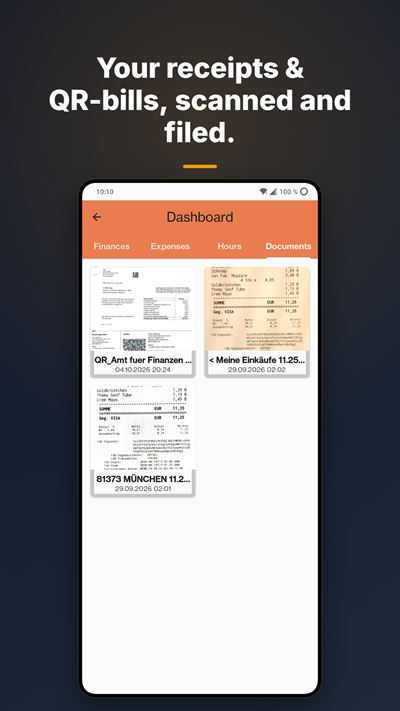
Amount, creditor and reference read from the Swiss QR code. The expense account and VAT rate you used for that supplier are applied automatically.
Works in the basement too
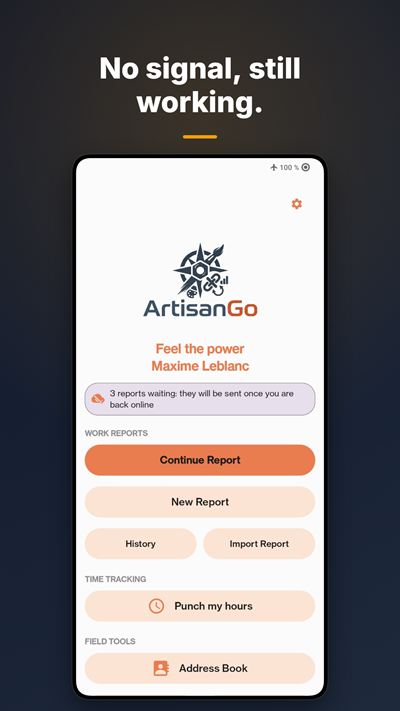
Full offline mode: in a basement, a tunnel or up a mountain. Everything syncs when you are back online.
In Bexio before you leave the site
Reports, invoices, quotes, contacts and catalogue synced with your Bexio account. If Bexio rejects a document, the app tells you which field to fix.
No Bexio? ArtisanGo works on its own too
Without Bexio, the app does it all on its own: quotes, invoices, reports and dashboard (finances, Cash tab with monthly balance, hours, inbox), even without a plan. With Team: no more limits, sending by email, your logo on your PDFs and no ArtisanGo branding.
See all featuresShow less
The right client, no searching
Your clients are geolocated: those within 3 km are automatically shown first, then your recent ones. With Bexio, you can leave out suppliers or any other contact category.
Documents that look professional
Clean PDF reports and invoices, ready to send. With a plan, no ArtisanGo branding. Your logo and company colour: on any plan without Bexio, or on Business with Bexio.
Snap the receipt, bin it
Shop, amount, date and VAT recognised right on the phone, no internet needed.
Open the app, know what to do
Pending or overdue invoices, unanswered quotes, orders to deliver: all on one screen. With Bexio, also the VAT invoiced for the period and the money in and out of your accounts; with Business, the year as a chart and where the money goes.
Record payments and send reminders without opening Bexio
With Bexio: record a payment, send the reminder to the client, invoice an accepted quote, duplicate an invoice or email it again, from the app.
Maintenance contracts run on their own
With Bexio: an order repeats every week, month or year, and Bexio creates the document on the planned date.
You know if the client opened the invoice
With Bexio: the client card shows the day they opened your invoice or quote. Viewed and still unpaid, it’s time to send a reminder; never opened, maybe the email address is wrong. And directions lead to the job site address, not the office.
Two companies, one app
Manage several Bexio companies from the same app.
Every client in their language
English, French, German and Italian: your clients get their documents in their own language. If a client’s Bexio record shows another language, the app warns you before sending.
Staff mode, just the essentials
The employee’s screen shows only their own work. Reports show who made them and carry the real signature date. With their own Bexio access (Team), they land straight in your inbox, ready to import. Without a Bexio account, create the employee in the app (Business): the free app is all they need, and their work reaches you by QR code, phone to phone.
The whole team in your company colours
With Business, your logo and colour reach your staff through a simple QR code. You also decide whether a signature is required before each send: the rule applies to the whole team.
Nothing gets lost
Back up reports, documents, scans and settings to a folder you own: memory card, Google Drive, OneDrive or Nextcloud. Free by hand, automatic every day with a plan. Nothing is stored on our side.
Reminder fees are added for you
With Bexio: set an amount per reminder level. At each reminder, ArtisanGo adds it to the Bexio invoice, without VAT, and replaces the fee of the previous reminder. An invoice that has already received a deposit gets its reminder without a fee.
Lines without VAT when you need them
Mark a fixed label “Without VAT” for fees or disbursements. Without Bexio, the PDF calculates VAT on the rest only and shows the part not subject to VAT. With Bexio, the line goes out with a 0% rate.
Find any report again
With or without Bexio: the history is sorted by report date, month by month. Search by client, number, date or the title of the job.
Hours and absences by QR code
With Bexio (Business): in the evening, your employee shows you a QR code with their hours and absences. You scan it, tick what is right, and everything goes into Bexio under their name. Hours written in a report can be taken over too.
The attendance overview
With Bexio (Business): everyone’s work and absences, month by month: holidays, illness, accident, military service, maternity, paternity. Your employee receives their holiday balance by QR code.
The app in pictures




Swipe →
Pricing
14-day free trial on every plan. No commitment, cancel anytime via Google Play. Prices in CHF, Swiss VAT included. Outside Switzerland, Google Play shows the exact price in your currency, including your country’s taxes.
Do you use Bexio?
- No, I work without it → Team, CHF 9.– / month
- Yes, and I work alone → Solo, CHF 14.– / month
- Yes, and I have staff → Business, CHF 35.– / month for you; Team, CHF 9.– / month per employee connected to Bexio; free for employees without a Bexio account
Team
CHF 9.– / month
CHF 90.– / year2 months free
For tradespeople without Bexio, and for staff on site whose boss has Business.
- Unlimited reports and clients
- Without Bexio: quotes and invoices sent by email
- Without Bexio: your logo on your PDFs
- No ArtisanGo branding on your documents
- For staff: timer, client signature, reports sent to the boss
- Automatic backup: your reports and settings go by themselves every day. And your boss’s setup arrives by QR code or file
- In the company’s colours: the logo and colour chosen by your boss appear on your reports, with nothing to set up
Solo
CHF 14.– / month
CHF 140.– / year2 months free
For self-employed tradespeople using Bexio.
- Quotes and invoices sent straight to Bexio
- Unlimited reports, clients and items
- Financial dashboard
- Timer, receipt scan, signature
- Customisable email text
- Automatic backup: once a day, your expenses, receipts and settings go by themselves to the folder you chose
Business
CHF 35.– / month
CHF 350.– / year2 months free
For owners with staff (admin of the Bexio account).
- Everything in Solo, with only your logo on documents, including those your staff hand over
- Your company colour on your documents: titles and headers in your exact shade, picked with a slider or hex code, different for each company
- Advanced dashboard
- Only you can roll out your setup by QR code, for each of your staff to scan
- You set the rule: require a signature from the client or your employee before each send, or not. Your staff get the rule with your setup
- Priority support
Always included, even without a plan
- Full offline mode
- An address book that shows clients within 3 km first
- Exported reports always encrypted. With a plan, turn on your personal key: the app generates a unique code to copy and keep.
- Manual backup and restore, free forever. With a plan, your data is also backed up automatically every day.
Without a plan, ArtisanGo stays usable with no time limit: 20 reports a month and 30 clients.
Got staff? Business for you, Team for those connected to Bexio, and the free app for everyone else.
Frequently asked questions
Pricing and plans
What can I do for free?
A lot. 20 reports a month, 30 clients and full offline mode. The only difference your clients will see: an ArtisanGo mention on your documents.
How much does it cost?
Team CHF 9.– per month or CHF 90.– per year, Solo CHF 14.– or 140.–, Business CHF 35.– or 350.–. The yearly plan gives you 2 months free. Every plan starts with a 14-day free trial, no commitment. Without a plan, the app stays free: 20 reports a month and 30 clients.
Why is Team (9.–) cheaper than Solo (14.–)?
Because it doesn’t do the same job. With Bexio, Team logs hours and sends them to the boss, without invoicing; Solo invoices straight into Bexio. Without Bexio, Team does it all.
Can I put my logo on my documents?
Yes. With Bexio: Business plan. Without Bexio: any paid plan.
I got a new phone: do I have to pay again?
No. Tap “Restore purchases” in the app: your plan is tied to your Google account, not to the phone or the Bexio company. Your settings come back from your setup file. Your data comes back with your backup and its recovery key.
With or without Bexio
Do I need Bexio to use ArtisanGo?
No.
Without Bexio: quotes, invoices, reports and dashboard, even for free.
With Bexio (Solo or Business): everything goes straight into your Bexio.
I’m on Team and I can’t issue an invoice.
That’s normal if you’re connected to Bexio: your hours go to the boss, who invoices. Without Bexio, Team invoices.
Without Bexio, how do I keep track of my money?
With the Cash tab, your cash book: what goes out and what comes in. Note income by hand (a job paid in cash, a deposit, a refund). Invoices marked as paid are added on their own, with their number and client. The balance shows for the year and for each month. What you are owed stays separate and never inflates the balance. In Finances, your documents are also grouped by month, with their count and total.
Does the app work out my VAT?
With Bexio, the dashboard shows the VAT invoiced: the VAT on the invoices you issued in the reporting period (quarterly by default, half-yearly with the net tax rate method, set per company). It is not necessarily what you will pay over: that depends on your VAT method.
Day to day
I started the timer without picking a client. Is the time lost?
No. Link it to the job later, from the client’s card: the time already counted is kept. You can also start straight from a client’s card in the address book, and switch from one job to the next in one tap. Never two timers running at once.
Does it work without signal?
Yes, for everyone, free version included. Everything syncs when you’re back online.
Can I keep suppliers out of my address book?
Yes, with Bexio. Your contacts’ Bexio categories (Customer, Supplier, Partner and your own) show on the contact card, can be changed in the app and go back to Bexio. In the company settings, exclude the categories you don’t need from location sorting: your address book only shows the contacts you are really looking for. A contact created from a scanned QR-bill already comes in as a supplier.
What about supplier invoices?
With Bexio, scan the QR-bill: it fills itself in. Supplier without VAT? Choose the “None” rate, just like Bexio. If Bexio refuses to book the invoice, the app gives you the number of the draft left in Bexio and the reason: no more entering it twice.
How can I see the app the way my employee does?
With Bexio (Business): in Settings → Company → Collaborators, tap “See the app as a collaborator”. The app looks the way it does for an employee with Bexio access, and a “Go back” banner on the home screen brings you back to your view. Your subscription does not change, and in Bexio you keep your administrator rights. For an employee without a Bexio account, the easiest way is to try it on a second, linked phone.
What about iPhone?
An iOS version is in the works. In the meantime, ArtisanGo is available for Android, through Google Play. Write to us at support@artisango.ch if you would like to hear when it is released.
Your data and backups
Are my exported reports protected?
Yes, always. With a plan, turn on personal encryption: the app generates a unique code to copy and save. Without that code, the file can’t be read.
Is my data backed up?
Yes, if you turn it on. ArtisanGo keeps nothing on our servers: you pick a folder you own (memory card, Google Drive, OneDrive, Nextcloud) and the backup is saved there. Settings → App → Backup and restore.
What is backed up?
Your expenses, reports, issued documents, scans and their receipts, contacts, settings and logo. Theme and language stay specific to each phone. Your Bexio credentials are never backed up: after a restore, you simply sign in again.
Does backup cost anything?
No. Manual backup and restore are free, forever. Only the automatic backup, once a day without asking, is part of the plan.
What is the recovery key for?
It is what opens your backups. It is shown on the backup screen, with a button to copy it.
Write it down somewhere other than your phone. Without it, a backup cannot be reopened, and we cannot recover it for you. It exists only on your device: that is exactly why no one else can read your documents.
How big is a backup?
The screen tells you before it starts. Scanned receipts make up most of the size, but each one is sent only once: later backups only transfer what is new.
Where is my data, and what if I stop paying?
On your phone, and in your Bexio if you’re connected. If you stop your plan, you keep it.
Didn’t find your answer? Email us: support@artisango.ch
14-day free trial
iOS version in the works
Google Play and the Google Play logo are trademarks of Google LLC.
A project born in the field
ArtisanGo is co-developed with Mémoires d’Arbres, a landscaping and arboriculture business, to match the real needs of craftsmen on-site.